How to Read Hours, Year, and Asking Price on Used Construction Equipment
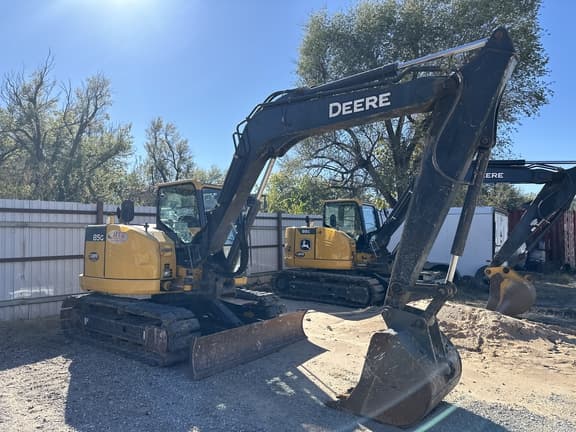
Hours, year, and asking price sit on almost every used-equipment listing card. They are useful — and easy to misread. This guide is about reading those three fields together so you can compare machines calmly before you inquire.
Track & Blade is a marketplace connecting buyers and sellers of used construction equipment. We are not the seller of record. The numbers on a card come from the listing; your next step is to connect with the seller, not to treat the page as an appraisal or a yard quote.
What the listing card is trying to tell you
A solid used listing usually answers three questions at a glance:
- How much work has the machine logged? (hours)
- How old is the platform? (year / model year)
- What is the seller asking? (asking price)
Those fields do not replace a walkaround, a cold start, or a conversation about maintenance and configuration. They help you sort candidates and decide which listings deserve a closer look.
On Track & Blade, hours and asking price are meant to stay visible on the card — the same idea across classes, whether you are browsing used excavators, compact track loaders, or dozers.
Hours: what the meter usually counts (and what it doesn’t)
Hour meters on construction equipment generally accumulate time while the machine is running. Exact behavior varies by make, model, and how the meter is wired. Treat the displayed hours as a reported figure on the listing, not as a certified life-cycle report.
What hours usually *do* help with:
- Comparing two similar machines in the same class
- Spotting outliers (very low hours on an older year, or very high hours on a newer year)
- Framing questions for the seller (“What’s the service history at this hour range?”)
What hours alone usually *do not* tell you:
- How hard the machine worked (idle vs production, light site work vs quarry cycles)
- Undercarriage or tire remaining life
- Whether major components were rebuilt, replaced, or deferred
- Whether the meter matches engine-control or other onboard data
Idle, working hours, ECM vs cab meter (high-level red flags)
Some platforms distinguish idle time from working time; many older machines do not. Cab meters and electronic control module (ECM) records can disagree. You do not need to become a forensic hour-meter expert to buy carefully. You do need a short checklist of questions:
- Does the seller have service records that line up with the stated hours?
- Has anyone mentioned a meter change, rebuild, or ECM readout that differs from the cab display?
- Are photos sharp enough to read the meter (when shown), and does the number match the card?
Mismatch between story, photos, and stated hours is a reason to slow down — not a reason for Track & Blade (or any marketplace) to “certify” the meter. Verification stays between you and the seller, often with an independent inspector when the stakes are high.
Year / model year vs hours — reading them together
Year without hours, or hours without year, is only half a picture.
A newer year with high hours can still be a strong production machine if maintenance kept up. An older year with low hours can look attractive on paper and still need serious work if storage, seals, hydraulics, or undercarriage sat poorly. Buyers who fixate on one number and ignore the other often rank the wrong shortlist.
Practical pairing:
| Pattern | What to ask next |
|---|---|
| Newer year + high hours | Application, service intervals, recent major work |
| Older year + low hours | Storage history, leaks after sitting, meter confidence |
| Similar year + similar hours | Configuration, attachments, undercarriage/tires, location |
| Same ask, very different hours | Why the ask is close — options, condition, urgency, transport |
Application severity beats vanity-low hours
Low hours are not automatically “better.” A machine that spent its life in abrasive, dusty, or continuous production use can wear differently than one used seasonally on lighter site work — even at similar meter readings. Ask what the machine did: clearing, finish grade, loading trucks, utility digs, rental fleet cycles, and so on. Application context often explains an ask better than the hour number alone.
Asking price — starting point, not a market appraisal
The asking price is what the seller is asking on that listing. It is a starting point for a conversation, not a Track & Blade appraisal, not financing advice, and not a guarantee of “market value.”
Track & Blade does not set comps, publish invented market ranges, or tell you what a machine “should” sell for. Comparing asks across live cards is useful; treating any single ask as an official valuation is not.
When you weigh an ask, keep the full card in view:
- Hours and year together
- Configuration and attachments shown
- Photo quality and completeness
- Seller location (transport is between buyer and seller, on the seller’s terms)
- Your job fit — the right machine at a fair ask beats a cheap machine that does not match the work
If you need a formal valuation for a lender or insurance purpose, that is a separate professional service between you and the parties you hire. It is not something the marketplace desk provides as an appraisal product.
Photos and configuration that change the ask
Two machines with similar year and hours can justify different asks because of what is (or is not) on them:
- Couplers, thumbs, blades, rippers, forks, buckets, and auxiliary hydraulics
- Undercarriage photos vs tire condition
- Leak evidence, paint, weld repairs, and glass
- Cab options, controls, and grade-control readiness (when stated)
- Missing vs included attachments in the ask
If a listing is light on photos, ask for a cold-start video and a walkaround before you travel or commit. Configuration clarity saves more deals than arguing about a few hundred hours on the meter.
Seller location and next steps (inquiry, not “buy now from our yard”)
Listings can come from sellers in different places. Location on the card is the seller’s location for that machine — not a Track & Blade storefront or yard.
Next steps on a marketplace are usually:
- Shortlist cards that fit the job
- Inquire to connect with the seller
- Align on inspection, payment terms, and transport between buyer and seller
Track & Blade does not haul freight, quote lowboys, or act as escrow. Hauling and delivery follow the seller’s terms. Inspection and payment are likewise between the parties.
How Track & Blade shows hours, year, and ask
Browse the open catalog on Inventory or featured units on Super Sale. Class hubs such as excavators, compact track loaders, and dozers are useful when you already know the machine type.
On each live card, use hours, year, and ask as your first filter — then dig into photos, configuration, and seller conversation. Soft path: find a fit → inquire → talk to the seller.
Next: use the pre-buy checklist
Reading the card is step one. Before you commit time or money, walk a structured verification list: identity of the machine, photos and video, condition categories, documents and ownership questions, inspection, transport planning, and walk-away red flags.
Companion guide: Checklist: What to Verify Before You Buy Used Heavy Equipment on a Marketplace.
If you want help navigating listings or connecting with a seller on a unit you are looking at, reach the desk at (405) 873-7772 or sales@trackandblade.com, or use Contact.